

Introduction:
Thanks to @webdriverio , i came to know about the chromedriver npm package. It’s a cool library that allows you to detect the installed chrome version and download the compatible chromedriver version automatically
https://www.npmjs.com/package/chromedriver
Pre-requisite:
install nodejs >v 10 : install
you can also download just the binary file instead of installing nodejs
now just run the below command
<oath_to_npm>/npm install -g chromedriver --detect_chromedriver_version --scripts-prepend-node-path
you can see the supported command-line flags at :
https://www.npmjs.com/package/chromedriver
Note: — scripts-prepend-node-path should be last argument, this flag is mandatory only if you are using node binaries than installation
if you want to download the binary to a specific folder then use the below repo instead:
I have added features to set target directory and download driver when used as a library. I have created a pull request for these but till that gets merged use the below repo instead
https://www.npmjs.com/package/chromedriver
download the zip or clone the files, unzip the content and then use the below command
C:\Users\test\Downloads\node-v14.17.0-win-x64\npm install -g "C:\Users\test\Downloads\chromedriver-main\chromedriver-main" --chromedriver_download_to_target_folder="C:\Users\test\Downloads\chromedriver-main\output" --scripts-prepend-node-path
Note: — scripts-prepend-node-path should be given as the last argument if you are running nodejs binary zip directly instead of installing nodejs
This will add node to PATH automatically for the scripts to detect
Now let see how we can run this library from nodejs , Note I have given information about alternative simple native libraries that does the same :
Running from Java:
You can run this nodejs library from java as:
package test_suites;
import java.io.IOException;
import java.util.regex.Matcher;
import java.util.regex.Pattern;
public class Testcase1 {
public static void main(String[] args) throws IOException, InterruptedException {
// just donwload the nodejs binary zip file and extract it
    //point to the npm.cmd inside the extracted folder
//if you already have nodejs installed then point to the npm.cmd of the installed library
    ProcessBuilder pb = new ProcessBuilder("C:\\Users\\test\\Downloads\\node-v14.17.0-win-x64\\npm.cmd",
      "install",
      "-g",
      "C:\\Users\\test\\Downloads\\chromedriver-main\\chromedriver-main",
      "--detect_chromedriver_version",
//  "--chromedriver-force-download",  // uncomment to force chromedriver dwonload even if it exists
      // "--chromedriver_version=88.0.4324.96", //comment detect version and hard code the version
// "--chromedriver_download_to_target_folder=\"C:\\Users\\test\\Downloads\\temp_2\\github_chromedriver\\output\"" // available only for praveendvd/chromedriver repo
      "--scripts-prepend-node-path"); //"--scripts-prepend-node-path" should be always the last argument
Process p = null;
    String result = null;
    String error = null;
p = pb.start();
System.out.println("Started download ###############################");
//wait for download to complete
    p.waitFor();
System.out.println("Output ###############################");
System.out.println("Output stream ###############################");
result = new String(p.getInputStream().readAllBytes());
    System.out.println(result);
System.out.println("Error stream ###############################");
error = new String(p.getErrorStream().readAllBytes());
    System.out.println(error);
System.out.println("Output end ###############################");
Pattern pattern = Pattern.compile("ChromeDriver binary available at(.*?)\n", Pattern.DOTALL);
    Matcher matcher = pattern.matcher(result);
    matcher.find();
    String chromedriverpath = matcher.group(1).trim();
System.out.println("****The driver is copied to**** : " + chromedriverpath );
System.out.println("Completed download ###############################");
}
}
Output:

Or use :
GitHub — bonigarcia/webdrivermanager: Automated driver management for Selenium WebDriver
Mvn:
<dependency>
<groupId>io.github.bonigarcia</groupId>
<artifactId>webdrivermanager</artifactId>
<version>4.4.3</version>
</dependency>
Code:
import io.github.bonigarcia.wdm.WebDriverManager;
import io.github.bonigarcia.wdm.config.DriverManagerType;
public class Testcase1 {
public static void main(String[] args) throws IOException, InterruptedException {
WebDriverManager.getInstance(DriverManagerType.CHROME).forceDownload();
WebDriverManager.chromedriver().setup();
System.out.println(WebDriverManager.getInstance(DriverManagerType.CHROME).getDownloadedDriverPath());
}
}
Running from Python:
import subprocess
import sys
import re
command = subprocess.run(
[
"C:\\Users\\Downloads\\node-v14.17.0-win-x64\\npm.cmd",
"install",
"-g",
"C:\\Users\\Downloads\\chromedriver-main\\chromedriver-main",
"--detect_chromedriver_version",
# "--chromedriver-force-download", # uncomment to force chromedriver dwonload even if it exists
# "--chromedriver_version=88.0.4324.96", #comment detect version and hard code the version
# "--chromedriver_download_to_target_folder=\"C:\\Downloads\\temp_2\\github_chromedriver\\output\"" # available only for praveendvd/chromedriver repo
"--scripts-prepend-node-path",
],
capture_output=True,
)
# --scripts-prepend-node-path" should be always the last argument'''
print("Started download ###############################")
print("Output ###############################")
print("Output stream ###############################")
sys.stdout.buffer.write(command.stdout)
print("Error stream ###############################")
sys.stderr.buffer.write(command.stderr)
print("Output end ###############################")
output = command.stdout
result = re.search("ChromeDriver binary available at(.*?)\n", output.decode('utf-8') )
chromedriverpath = result.group(1)
print("****The driver is copied to**** : " + chromedriverpath )
print(("Completed download ###############################"))
sys.exit(command.returncode)
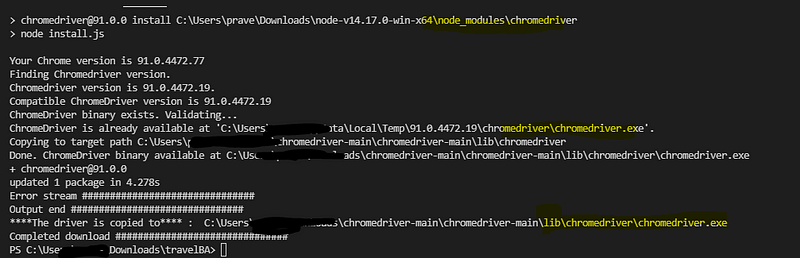
Output:
Or use:
library: chromedriver-autoinstaller · PyPI
pip install chromedriver-autoinstaller
code:
import chromedriver_autoinstaller
# Check if the current version of chromedriver exists
# and if it doesn’t exist, download it automatically,
# then add chromedriver to path
driver = webdriver.Chrome(chromedriver_autoinstaller.install())
Running from Nodejs:
Clone or download and extract :
https://github.com/praveendvd/chromedriver
Now install the library to your npm project as :
C:\Users\test\Downloads\node-v14.17.0-win-x64\npm install "C:\Users\test\Downloads\chromedriver-main\chromedriver-main" --chromedriver_download_to_target_folder="C:\Users\test\Downloads\chromedriver-main\output" --scripts-prepend-node-path
Now you can use this library to autodownload compatible chrome driver version as :
var chromedriver =  require('chromedriver');
process.env.detect_chromedriver_version = true
process.env.chromedriver_force_download = true
process.env.chromedriver_download_to_target_folder="C:/Users/output"
chromedriver.download() //returns a promise
 Learn with praveen