

step towards mobile automation….
Description:
Have you always wanted to get into mobile test automation space but was reluctant thinking you have no clue where to start?
Then here you go , a simple article outlining how to setup android emulator and find the locators for the elements using Appium studio and Android studio
(The Android Emulator simulates Android devices on your computer so that you can test your application on a variety of devices and Android API levels without needing to have each physical device)
Android Studio:
Install Android Studio:
This has the emulator .
https://developer.android.com/studio
Note: you might get an error at the end saying cannot open correctly follow the below step
Fixing “application cannot start correctly 0xc00007b”
you can use any of the below approach:
First approach:
In windows go to the installation folder and open
android studio/bin and double click studio.bat
Change the Target of your android studio in the start menu to this bat
Second Approach:
c:\Program Files\Android\Android Studio\bin\studio64.exe to the exploit protection in windows and disable ASLR
https://stackoverflow.com/a/56537135/6793637
Install SDK in android studio:
click SDK manager:

Select the desired SDK android version and click apply.
This will install the SDK:

Set Environment Variables:
goto windows and type edit environment variables and this two environment variable
Add the value as the path to which SDK is installed

Configure emulator (Virtual device):
Click AVD Manager

Configure the device as you want and at the end use graphics as software ( use hardware only if you have a graphic card)

Install HAXM:

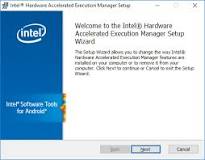
Hyper-V is a virtualization feature of Windows that makes it possible to run virtualized computer systems on a physical host computer. Intel’s Hardware Accelerated Execution Manager (HAXM). HAXM is a virtualization engine for computers running Intel CPUs.
Install system image:

Click play to start the simulator and then power it own:

Check if device is find by adb driver:
ADB is a command line tool that allows users to control their Android device on their Windows PC
to check if the emulator is detected by the driver use below command
adb devices

Appium and Appium studio :
Appium allows to interact with mobile drivers and through that to the device or emulator
It also has inbuild inspector to inspect the elements locators
Install Appium:
goto : https://github.com/appium/appium-desktop/releases
Find the build with tag latest , download
the windows version
Install appium using npm:
you can also use appium as command line tool using npm , but you need appium studio to inspect elements anyways.
npm install -g appium
Start Appium studio:
click start server

Open element inspect:

Now add the capability:
click save. and then click start session

Eg capabilities : here we are telling the apk of the app we are testing and all other information.
{
   "platformName": "Android",
   "appium:platformVersion": "11",
   "appium:deviceName": "Android Emulator",
   "appium:app": "C:\Users\prave\Downloads\ApiDemos-debug.apk",
   "appium:automationName": "UiAutomator2"
 }
After starting session , inspect elements:

use the select element to find the locator and use red mark option to click any element,

Other buttons are self exploratory can be used to navigate through different views
Finding Current activity locator: ( Thanks to testsigma.com)
in windows use below command:
adb shell dumpsys window | find "mCurrentFocus"
in linux/mac :
adb shell dumpsys window | grep -E 'mCurrentFocus'
Output:

The blue marked part after u0 is the package name and the remaining section is the activity name

