Using momentjs-timezone in Postman

External libraries can be executed in postman if CDN equivalent of these libraries are available.

You can get CDN in equivalent from websites like: https://cdnjs.com/

Now to use momentTZ in postman, copy the below code into script section and execute it once and then comment out:

This will store the CDN equivalent of momentTZ and momentJS libraries to environment variables.

pm.sendRequest("https://cdnjs.cloudflare.com/ajax/libs/moment-timezone/0.5.33/moment-timezone-with-data-2012-2022.min.js", (mtzErr, mtzRes) => {
pm.sendRequest("https://cdnjs.cloudflare.com/ajax/libs/moment.js/2.29.1/moment.min.js", (mjsErr, mjsRes) => {
//you have to initialize the momentjs to make momenttz work so we are storing both into a variable
pm.environment.set("momentjs", mjsRes.text());
pm.environment.set("momenttz", mtzRes.text());
})
})

Now you initiate the libraries in either of the two approaches:

First Approach:

Now comment out the above code you don’t need it anymore. Now you can use momenttz anywhere in your collection’s script sections as :

eval(pm.environment.get("momentjs"));
eval(pm.environment.get("momenttz"));
console.log(this.moment.utc().tz("America/Los_Angeles", "UTC").format())

in this approach, the libraries are initialized in the local scope, so if you want to use them again then you have to run the 3 lines of code again in other script sections whenever it’s used.

Second approach:

new Function triggers function in the global scope. so you just have to execute the first two lines only ones in your collection run and it will be available globally throughout:

Add in first scripts pre-request script:

(new Function(pm.environment.get("momentjs")))();
(new Function(pm.environment.get("momenttz")))();

Now you can use momentTZ library anywhere as :

console.log(moment.utc().tz("America/Los_Angeles", "UTC").format())

😀 😬 😁 😂 😃 😄 😅

Using external libraries in postman and there by using custom helper in Postman visualization!

Postman allows you to use CDN libraries in the script session,

so here we are using the CDN equivalent of the handlebar and then passing the compiled template to the postman visualizer

**We can initialize CDN in two ways :**

**First Approach:**

By initializing the CDN in global space using “new Function(cdn)()”

You can see the code below , but this will mess up global scope and can be used only once in the entire run*

// you can call any package with min build in postman
pm.sendRequest("https://cdnjs.cloudflare.com/ajax/libs/handlebars.js/4.7.7/handlebars.js", (err, res) => {
pm.environment.set("res", res.text());
// intialize the min.js
new Function(pm.environment.get("res"))();
//create template soource
var source =
`{{#ifCond v1 v2}}
{{v1}} is equal to {{v2}}
{{else}}
{{v1}} is not equal to {{v2}}
{{/ifCond}}`;
//you can call methods in the cdn file using this keyword
//here we are registring handlebar
Handlebars.registerHelper('ifCond', function (v1, v2, options) {
if (v1 === v2) {
return options.fn(this);
}
return options.inverse(this);
});
//compile the template
var template = Handlebars.compile(source);
//data to be passed 
// try v1 and v2 with same and different values and observe the output in visualization tab
var data = {
"v1": "test",
"v2": "test",
};
// passing the data to template
var result = template(data);
//visualizing it 
pm.visualizer.set(result)
})

**Second Approach:**

you can call any package with min build in postman

this initializes the functions in local scope so it won’t mess up the global space and cause issues

pm.sendRequest("https://cdnjs.cloudflare.com/ajax/libs/handlebars.js/4.7.7/handlebars.min.js", (err, res) => {
pm.environment.set("res", res.text());
// intialize the min.js
eval(pm.environment.get("res"));
//create template soource
var source =
`{{#ifCond v1 v2}}
{{v1}} is equal to {{v2}}
{{else}}
{{v1}} is not equal to {{v2}}
{{/ifCond}}`;
//you can call methods in the cdn file using this keyword
//here we are registring handlebar
this.Handlebars.registerHelper('ifCond', function (v1, v2, options) {
if (v1 === v2) {
return options.fn(this);
}
return options.inverse(this);
});
//compile the template
var template = this.Handlebars.compile(source);
//data to be passed
// try v1 and v2 with same and different values and observe the output in visualization tab
var data = {
"v1": "test",
"v2": "test",
};
// passing the data to template
var result = template(data);
//visualizing it
pm.visualizer.set(result)
})

Creating Json Object From string in Java (Rest-assured):

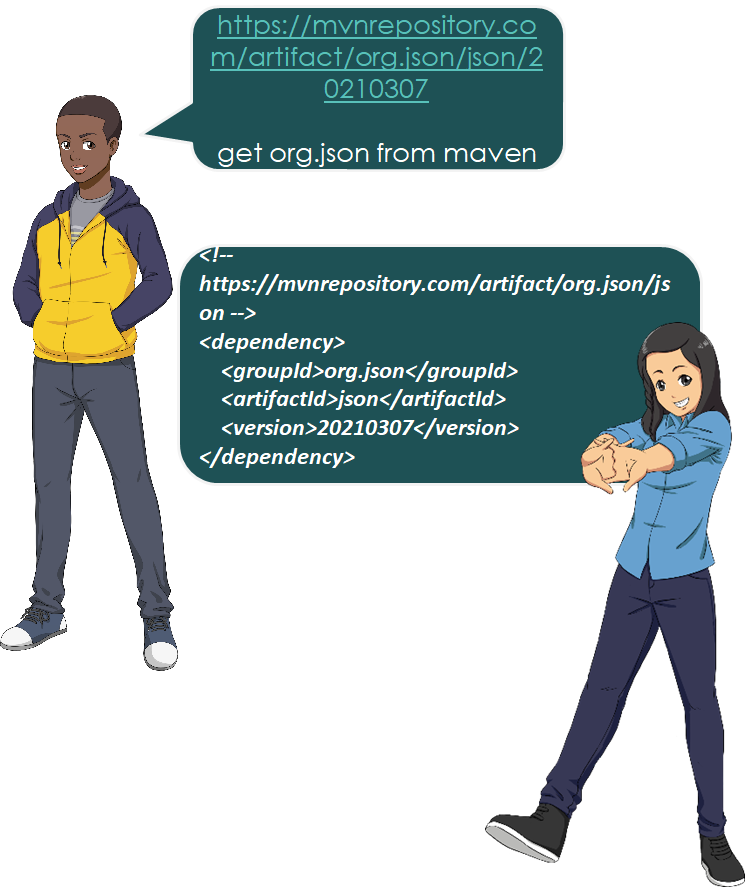
https://mvnrepository.co m/artifact/org.json/json/2 0210307

get org.json from maven

add below dependency to your maven:

<!--
https://mvnrepository.com/artifact/org.json/js
on -->
<dependency>
<groupId>org.json</groupId>
<artifactId>json</artifactId>
<version>20210307</version>
</dependency>

Now import these:

//import these 
import org.json.JSONException;
import org.json.JSONObject;
import org.json.JSONArray;

Now you can convert a json string to json object just like that:

//now you can convert string to array and
object without having complicated maps
and objects
try {
JSONArray jsonArray = new
JSONArray("[1,2,3,4,5]");
//you can give entire jsonObject here
JSONObject jsonObject = new
JSONObject("{\"name\": [\"praveen\"]}");
System.out.println("outputarray: " +
jsonArray.toString(2));
System.out.println("outputObject: " +
jsonObject.toString(2));
} catch (JSONException err) {
System.out.println("Error: " +
err.toString());
}

Sending request as

Response response = RestAssured.given() .header("Content-type", "application/json") .and() .body("{\r\n" + " \"name\": \"praveen\",\r\n" + " \"job\": \"leader\"\r\n" + "}") .when() .post("https://reqres.in/api/users") .then() .extract().response(); System.out.println(response.prettyPrint());

Postman trick and tips: How to run a specific iteration data from Newman

There is no inbuilt way to specify a specific iteration row to be executed using Newman, but can be done using Powershell or by using Newman as a library.

The approaches are as below

Powershell:

here we read the actual csv file in the current directory using import csv

Then considers only row 1..2 , if you just want 1 row you can change $a[1..2] to $[1]

$a= Import-Csv .\a.csv
$a[1..2] | Select-Object * | export-csv -Path .\temp.csv -NoTypeInformation
newman run .\test.postman_collection.json -d .\temp.csv

As library:

here we read and split the csv as we want using csv parser and then write it back to a temp file as csv using csv-stringify library.

First, install:

npm install csv
npm install fs
npm i fs-extra
npm install newman

Then use the below code

const newman = require('newman'); // require newman in your project
const stringify = require('csv-stringify')
const parse = require('csv-parse/lib/sync')
const fs = require("fs")
// call newman.run to pass `options` object and wait for callback
let data = fs.readFileSync('./a.csv',
{ encoding: 'utf8', flag: 'r' });
data = parse(data, {
columns: true,
    skip_empty_lines: true
})
console.log(data)
//index doesn't consider header so 0 is first data row
stringify(data.slice(0, 2), {
header: true
}, function (err, output) {

    fs.writeFileSync("temp.csv", output);

    newman.run({
collection: require('./test.postman_collection.json'),
reporters: 'cli',
iterationData: "./temp.csv"
}, function (err) {
if (err) { throw err; }
console.log('collection run complete!');
});
})

Data driven testing per request without using data file

Create a environment variable called “csv” and copy the below content and paste it as value:

username,password,error_message,error_code
username1,password1,errormessage1,errorcode1

Now in pre-request add :

//we use variables as it will get destroyed after the run . So if index returns null then it means it’s the first iteration
if (!pm.variables.get("index")) {
    const parse = require('csv-parse/lib/sync')
//Environmental variable where we copy-pasted the csv content
const input = pm.environment.get("csv");
const records = parse(input, {
columns: true,
skip_empty_lines: true
})
    pm.variables.set("index", 0)
pm.variables.set("records", records)
}
records = pm.variables.get("records")
index = pm.variables.get("index")
//we are setting variable 
if (index !== records.length) {
for (let i of Object.entries(records[index])) {
pm.variables.set(i[0], i[1])
}
pm.variables.set("index", ++index)
pm.variables.get("index")===records.length?null:postman.setNextRequest(pm.info.requestName)
}

Now you can run data driven for that one particular request:

Note that here we used pm.variables. this is because it creates local variable that get destroyed after the collection run completes .

So for each run , first value will be null and then will be set to 0

Eg collection:

https://www.postman.com/collections/eb144d613b7becb22482

use the same data as environment variable content , now run the collection using collection runner or newman.

You can import this collection by clicking file >import >and then choosing links

Output:

How to run postman requests using Tags

Get all requests in the collection:

you can also get information about all the requests in a collection by using :

https://api.getpostman.com/collections/{{collection_UUID}}

to get uuid and api key goto :

https://app.getpostman.com

Now for generating api key >

goto account settings > api key and generate api key.

to get collection uuid goto specific workspace and collection and copy the uuid part from url:

Note: you can also get UUID by clicking collection and clicking info panel on the right side

Now in your collection

Rename all requests as:

get user details [Regression][Smoke][Somethingelse]
get account details [Regression]

Then Create a new request called initial request and keep it as the first request in your collection:

url: https://api.getpostman.com/collections/8xxxxtheuuidyoucopied

authorization: apikey-header : key: X-Api-Key and value: yourapikey

test-script :

pm.environment.unset("requestToRun")
reqeustlist = pm.response.json().collection.item.map((a) => a.name)
requestToRun = reqeustlist.filter((a) => a.includes(pm.environment.get("tag")))
let val = requestToRun.pop()
pm.environment.set("requestToRun", requestToRun)
val ? postman.setNextRequest(val) : postman.setNextRequest(null)

Now set the envirnoment variable as what you want to look for eg: run script that contains text “Regression” then set pm.environment.set("tag","Regression")

Now in your collection-pre-request add:

if (pm.info.requestName !== "initial request") {
let requestToRun = pm.environment.get("requestToRun")
let val = requestToRun.pop()
pm.environment.set("requestToRun", requestToRun)
val ? postman.setNextRequest(val) : postman.setNextRequest(null)
}

Output:

Ran only reqeusts that has “Copy” in its name

Example collection:

https://www.getpostman.com/collections/73e771fe61f7781f8598 , you can click ctrl+o and choose link to import this collection

Note: In newman you can pass the environment variable as “ — env-var tag=Regression”

Passing request body multiform-data file source as variable in postman.

Issue:

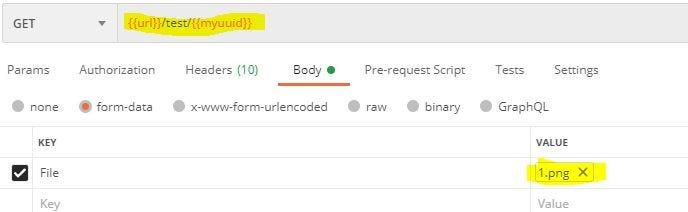
In postman if we check the UI, we notice that there is no way to define file path as variable.

This looks like a limitation when we need to run file from different systems

Solution:

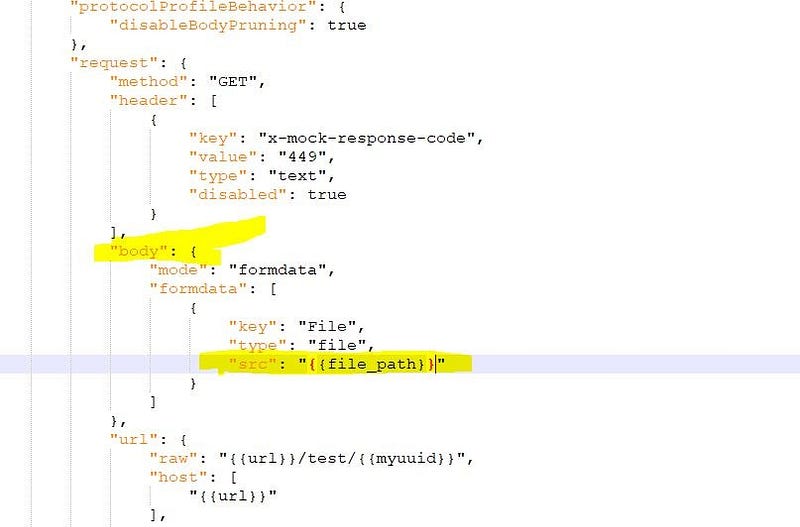
The solution is to hack the collection.json file. Open the json and edit the formdata src and replace it with a variable, let say fire_path so : {{fire_path}}

Now in Postman:

in pre request you can below code to set the path

pm.environment.set("file_path","C:/Users/guest/Desktop/1.png")

You can also save it as environment variable directly or pass through cmd using — env-var when using newman.

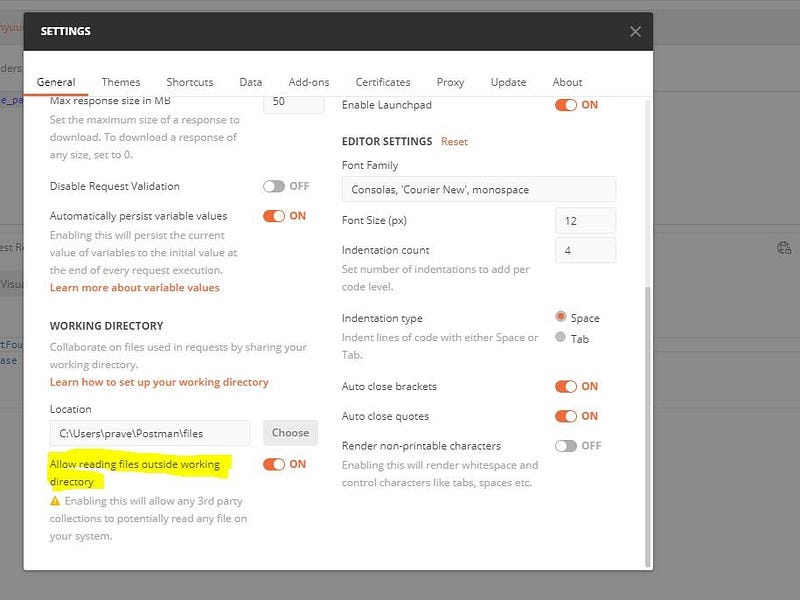
Note:

set access file from outside working directory as true (settings from top right corner)