What is the difference between BDD and Keyword driven automation framework?

Courtesy: https://app.animaker.com/dashboard#_=_

First understand BDD:

BDD is not just about testing it is a type of development practice, that avoids the difficulty of providing a definition of “Done”.

https://dannorth.net/introducing-bdd/ the author of BDD style states that:

“Behaviour” is a more useful word than “test”

Now I had a tool — agiledox — to remove the word “test” and a template for each test method name. It suddenly occurred to me that people’s misunderstandings about TDD almost always came back to the word “test”.

That’s not to say that testing isn’t intrinsic to TDD — the resulting set of methods is an effective way of ensuring your code works. However, if the methods do not comprehensively describe the behaviour of your system, then they are lulling you into a false sense of security.

I started using the word “behaviour” in place of “test” in my dealings with TDD and found that not only did it seem to fit but also that a whole category of coaching questions magically dissolved. I now had answers to some of those TDD questions. What to call your test is easy — it’s a sentence describing the next behaviour in which you are interested. How much to test becomes moot — you can only describe so much behaviour in a single sentence. When a test fails, simply work through the process described above — either you introduced a bug, the behaviour moved, or the test is no longer relevant.

I found the shift from thinking in tests to thinking in behaviour so profound that I started to refer to TDD as BDD, or behaviour- driven development.

It shows that focusing on the behavior of the system than on functionality we get more clear understanding on:

  1. What to implement
  2. What to test
  3. What to consider as acceptance criteria for marking a story “done
  4. Where to start: keep story as the starting point , it defines what functionality and what behavior the system should have. It avoids the cases of having misunderstanding about the system and ensures there is no “absence of error fallacy” (absence of error fallacy mean there is no errors but the system itself is not usable as it was not build the way it was required to be )
  5. What changes to make and what are its effect on the system behavior
  6. Provides more traceability and visibility of system functionality and features
  7. More test coverage traceability as you know what all scenarios or behaviors to be covered

Difference between BDD and KDT

BDD:

https://dannorth.net/whats-in-a-story/

Behaviour-driven development uses a story as the basic unit of
 functionality, and therefore of delivery. The acceptance criteria are
 an intrinsic part of the story — in effect they define the scope of
 its behaviour, and give us a shared definition of “done”. They are
 also used as the basis for estimation when we come to do our planning.
 
 Most importantly, the stories are the result of conversations between
 the project stakeholders, business analysts, testers and developers.
 BDD is as much about the interactions between the various people in
 the project as it is about the outputs of the development process.

KDT

Keyword driven testing is a way of achieving the BDD approach in testing , you can define the behavior of a system using **keyword**.

you can also do this using **Gherkin** as in cucumber

Framework like **Robotframework** supports both keyword abstraction and use of Gherkin(Given,when,then)

Summary:

BDD is a development practice where user stories are defined by defining the expected behavior of the system towards a specific action. It allows more clarity on what to develop, test and deliver.

and KDT is the approach of implementing BDD in test framework so that we get test coverage and one to one traceability with our test scripts and user stories

Gherkin is another syntactical way of defining BDD in test,

so you can use both Gherkin, Keyword driven , or simple page object method abstractions that defines behavior than functionality in your BDD test framework.

example:

As a [X]
I want [Y]
so that [Z]

where Y is some feature, Z is the benefit or value of the feature, and X is the person (or role) who will benefit. Its strength is that it forces you to identify the value of delivering a story when you first define it.

Another form of explaining behavior would be :

Given some initial context (the givens),
When an event occurs,
then ensure some outcomes.

in both forms there is an action by the actor/user and an expected behavior from the system.

Important:

Unless the keywords or Gherkin or test methods defines the behavior of the system , non of Gherkin , Keyword driven or simple test methods cannot be considered as Behavior driven, they become just Gherkin , KDT or plain low test methods.

so not all keywords or Gherkin or test methods are BDD compliant

Creating Cucumber Extent Report the Right way.

The right way is to use custom formatter (Plugins)

So what does this means ?

We are going to create our own report plugin using Extent report.

As in TestNG reporting, where we override the TestNG listeners to tell TestNG what to do for each action or events,

Here, we implements Cucumber listener class to listen to cucumber events and tell it what to do for each event.

Cucumber sends events for each action like scenario started, step started, step finished etc to this instance of the listener. So here we handle these events and tell cucumber what to do with these events (In our case we will tell it to log it to extent report).

There are two listener interfaces:

  1. EventListener
  2. ConcurrentEventListener

So as the name suggests, concurrentEventListener is thread-safe and the other is not. The implementation is exactly the same so we will use only the concurrentEventListner so that our framework is threadsafe when we have to run things in parallel.

Our TestListener :

package cucumberHooks;
import com.aventstack.extentreports.ExtentReports;
import com.aventstack.extentreports.ExtentTest;
import com.aventstack.extentreports.Status;
import com.aventstack.extentreports.gherkin.model.Feature;
import com.aventstack.extentreports.gherkin.model.Given;
import com.aventstack.extentreports.gherkin.model.Scenario;
import com.aventstack.extentreports.reporter.ExtentSparkReporter;
import com.aventstack.extentreports.reporter.configuration.Theme;
import io.cucumber.plugin.EventListener;
import io.cucumber.plugin.event.EventPublisher;
import io.cucumber.plugin.event.PickleStepTestStep;
import io.cucumber.plugin.event.TestCaseStarted;
import io.cucumber.plugin.event.TestRunFinished;
import io.cucumber.plugin.event.TestRunStarted;
import io.cucumber.plugin.event.TestSourceRead;
import io.cucumber.plugin.event.TestStepFinished;
import io.cucumber.plugin.event.TestStepStarted;
import io.cucumber.plugin.event.HookTestStep;
import java.util.HashMap;
import java.util.Map;
public class customReportListener implements EventListener {
private ExtentSparkReporter spark;
private ExtentReports extent;
Map<String, ExtentTest> feature = new HashMap<String, ExtentTest>();
ExtentTest scenario;
ExtentTest step;
public customReportListener() {
};
@Override
public void setEventPublisher(EventPublisher publisher) {
// TODO Auto-generated method stub
/*
* :: is method reference , so this::collecTag means collectTags method in
* 'this' instance. Here we says runStarted method accepts or listens to
* TestRunStarted event type
*/
publisher.registerHandlerFor(TestRunStarted.class, this::runStarted);
publisher.registerHandlerFor(TestRunFinished.class, this::runFinished);
publisher.registerHandlerFor(TestSourceRead.class, this::featureRead);
publisher.registerHandlerFor(TestCaseStarted.class, this::ScenarioStarted);
publisher.registerHandlerFor(TestStepStarted.class, this::stepStarted);
publisher.registerHandlerFor(TestStepFinished.class, this::stepFinished);
};
/*
* Here we set argument type as TestRunStarted if you set anything else then the
* corresponding register shows error as it doesn't have a listner method that
* accepts the type specified in TestRunStarted.class
*/
// Here we create the reporter
private void runStarted(TestRunStarted event) {
spark = new ExtentSparkReporter("./ExtentReportResults.html");
extent = new ExtentReports();
spark.config().setTheme(Theme.DARK);
// Create extent report instance with spark reporter
extent.attachReporter(spark);
};
// TestRunFinished event is triggered when all feature file executions are
// completed
private void runFinished(TestRunFinished event) {
extent.flush();
};
// This event is triggered when feature file is read
// here we create the feature node
private void featureRead(TestSourceRead event) {
String featureSource = event.getUri().toString();
String featureName = featureSource.split(".*/")[1];
if (feature.get(featureSource) == null) {
feature.putIfAbsent(featureSource, extent.createTest(featureName));
}
};
// This event is triggered when Test Case is started
// here we create the scenario node
private void ScenarioStarted(TestCaseStarted event) {
String featureName = event.getTestCase().getUri().toString();
scenario = feature.get(featureName).createNode(event.getTestCase().getName());
};
// step started event
// here we creates the test node
private void stepStarted(TestStepStarted event) {
String stepName = " ";
String keyword = "Triggered the hook :";
// We checks whether the event is from a hook or step
if (event.getTestStep() instanceof PickleStepTestStep) {
// TestStepStarted event implements PickleStepTestStep interface
// WHich have additional methods to interact with the event object
// So we have to cast TestCase object to get those methods
PickleStepTestStep steps = (PickleStepTestStep) event.getTestStep();
stepName = steps.getStep().getText();
keyword = steps.getStep().getKeyword();
} else {
// Same with HoojTestStep
HookTestStep hoo = (HookTestStep) event.getTestStep();
stepName = hoo.getHookType().name();
}
step = scenario.createNode(Given.class, keyword + " " + stepName);
};
// This is triggered when TestStep is finished
private void stepFinished(TestStepFinished event) {
if (event.getResult().getStatus().toString() == "PASSED") {
step.log(Status.PASS, "This passed");
} else if (event.getResult().getStatus().toString() == "SKIPPED")
{
step.log(Status.SKIP, "This step was skipped ");
} else {
step.log(Status.FAIL, "This failed");
}
};
}

So now we have the Plugin created, let’s call it inside our runner class:

package cucumber_Runner;
import io.cucumber.testng.AbstractTestNGCucumberTests;
import io.cucumber.testng.CucumberOptions;
import org.testng.annotations.DataProvider;
@CucumberOptions(plugin = {“cucumberHooks.customReportListener”},
monochrome=true,
glue={“stepDefinitions”,”cucumberHooks”}, //Packagename
features = {“src\\featureFiles”} //FolderName
)
public class RunnerCucumber extends AbstractTestNGCucumberTests {
@DataProvider(parallel = true)
@Override
public Object[][] scenarios() {
return super.scenarios();
}
}

My Maven Dependency:

<dependencies>
<! —  https://mvnrepository.com/artifact/com.aventstack/extentreports
<dependency>
<groupId>com.aventstack</groupId>
<artifactId>extentreports</artifactId>
<version>4.1.5</version>
</dependency>
<! —  https://mvnrepository.com/artifact/io.cucumber/cucumber-testng
<dependency>
<groupId>io.cucumber</groupId>
<artifactId>cucumber-testng</artifactId>
<version>6.0.0-RC2</version>
</dependency>
<! —  https://mvnrepository.com/artifact/io.cucumber/cucumber-java
<dependency>
<groupId>io.cucumber</groupId>
<artifactId>cucumber-java</artifactId>
<version>6.0.0-RC2</version>
</dependency>
<! —  https://mvnrepository.com/artifact/com.beust/jcommander
<! —  https://mvnrepository.com/artifact/org.testng/testng
<! —  https://mvnrepository.com/artifact/com.beust/jcommander
<dependency>
<groupId>com.google.guava</groupId>
<artifactId>guava</artifactId>
<version>24.1-jre</version>
</dependency>
<! —  https://mvnrepository.com/artifact/org.testng/testng
<dependency>
<groupId>org.testng</groupId>
<artifactId>testng</artifactId>
<version>7.1.0</version>
</dependency>
<! —  https://mvnrepository.com/artifact/org.seleniumhq.selenium/selenium-java
<dependency>
<groupId>org.seleniumhq.selenium</groupId>
<artifactId>selenium-java</artifactId>
<version>4.0.0-alpha-4</version>
</dependency>
<dependency>
</dependencies>

Explanation :

The inLine comments will explain most things, but just to iterate.

  • Here the report will be saved in the current directory as ExtentReportResults.html
  • Plugin doesn’t allow any input (Thats why empty constructor) . so in runner file , this (plugin = {“cucumberHooks.customReportListener:”}, is wrong and this (plugin = {“cucumberHooks.customReportListener”}, is correct ( means there should be no colon :)
  • If you want to pass argument you can make the constructor accept the argument and pass it in plugin as (plugin = {“cucumberHooks.customReportListener:<argument>”},

The TestStep event and Hook events implements PickleStepTestStep and HookTestStep ,

These interfaces have additional methods that allows us to access step names type and keywords. Too access these steps we need to widden the object by casting it to PickleStepTestStep and HookTestStep ,

PickleStepTestStep steps = (PickleStepTestStep) event.getTestStep();
HookTestStep hoo = (HookTestStep) event.getTestStep();

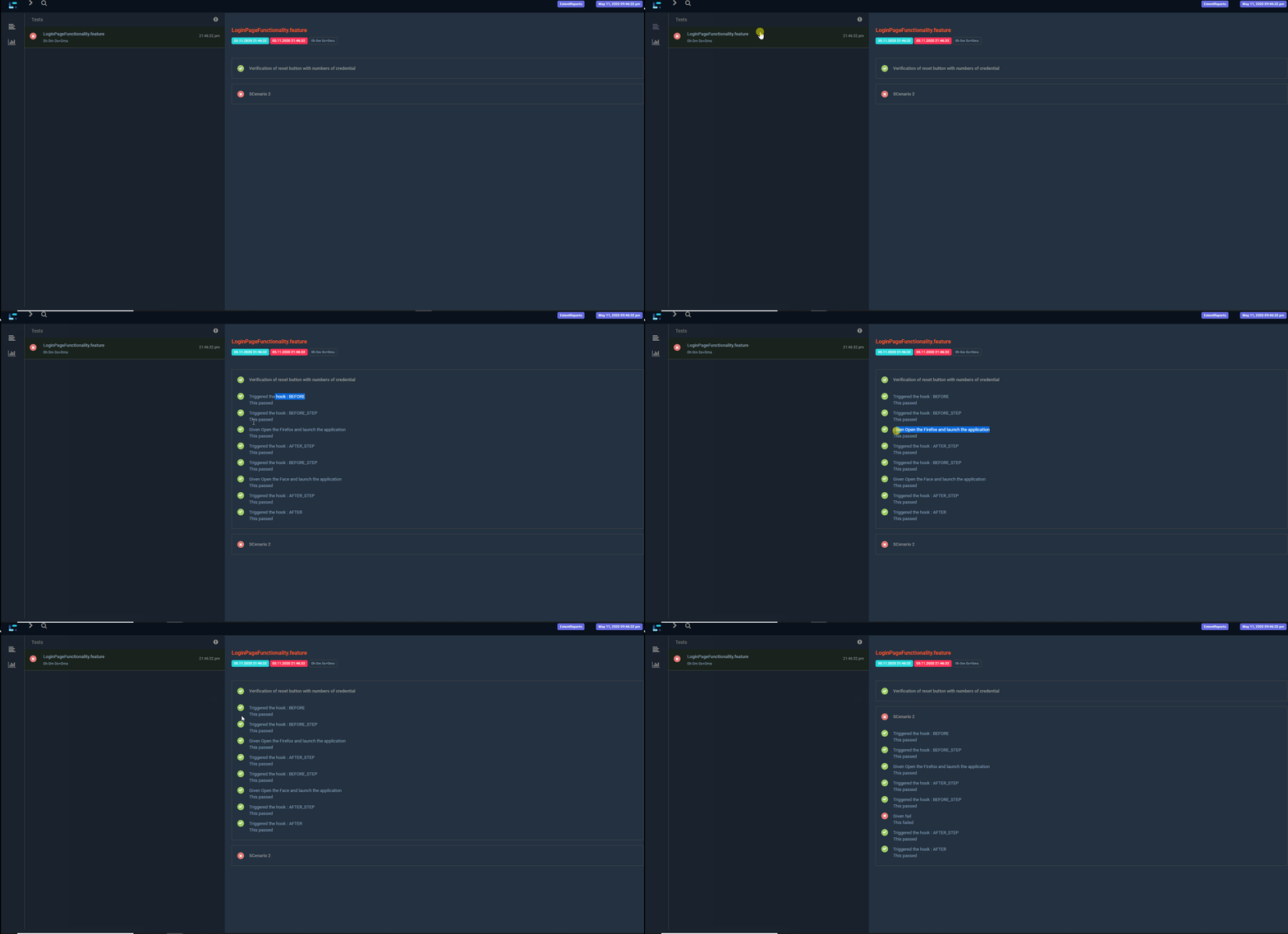
Output:

That’s it, now just run the runner class :

Protractor-cucumber Framework

Install dependencies:

  • cucumber : npm install cucumber (If protractor was installed locally else use npm install -g cucumber). Both protractor and cucumber should be in same scope.
  • cucumber-html-reporter: npm install cucumber-html-reporter — save-dev
  • chai: npm install chai
  • protractor-cucumber-framework: npm install — save-dev protractor-cucumber-framework

My package.json:

you can directly use the package.json and install all dependencies by placing the file under your test project and just running

npm install

package.json:

{
"name": "Test",
"version": "1.0.0",
"description": "Test framework for project Test",
"main": "conf.js",
"keywords": [
"test"
],
"author": "Praveen David Mathew",
"license": "ISC",
"dependencies": {
"chai": "^4.2.0",
},
"devDependencies": {
"cucumber": "^6.0.5",
"cucumber-html-reporter": "^5.1.0",
"protractor-cucumber-framework": "^6.2.0"
}
}

Now create chai expect global keyword:

Protractor uses jasmine out of the box, so when you are using the custom framework the jasmine expect class won’t work.

You have to use another assertion class , we are using chai.

We can use chai expect class by importing it in each step definition

'use strict';
expect = require('chai').expect;

This would be hectic, so work around is to declare expect as global in a separate file.

My chaiAssertions.js:

'use strict';
// Configure chai
global.expect = require('chai').expect;

Create Hook.js:

Hooks are just another stepdefinition file you can name it anything you want. A hook is identified using the keyword After and Before

Here i created a Hook.js file to get screenshot if scenario fails:

hook.js:

var { After, Before } = require('cucumber');
// Asynchronous Promise
After(async function(scenario) {
if (scenario.result.status === 'failed') {
const screenShot = await browser.takeScreenshot();
this.attach(screenShot, "image/png");
}
});

So after each scenario , the code inside after get executed. Which will take screenshot of scenario.result.status is failed.

Now my conf.js

'use strict';
exports.config = {
directConnect: true,
//Running chrome 
Capabilities: { browserName: 'chrome'
},
//point spec to feature file , my feature file was under feature folder
specs: ['feature/*.feature'],
//set framework options
framework: 'custom',
frameworkPath: require.resolve('protractor-cucumber-framework'),
//just maximizing window before testing
onPrepare: function(){
browser.waitForAngularEnabled(true);
browser.driver.manage().window().maximize();
} ,
//Create html report 
onComplete: () => {
var reporter = require('cucumber-html-reporter');
var options = {
theme: 'bootstrap',
jsonFile: './results.json',
output: './results.html',
reportSuiteAsScenarios: true,
launchReport: true,
metadata: {
"App Version":"0.3.2",
"Test Environment": "STAGING",
"Browser": "Chrome 54.0.2840.98",
"Platform": "Windows 10",
"Parallel": "Scenarios",
"Executed": "Remote"
},
output: './report/cucumber_report.html',
};
reporter.generate(options);
},
//set cucumber options
cucumberOpts: {
require: ['./testsuites/*.js','./commons/chaiAssertions.js','./commons/hooks.js'],
strict: true,
format: [], //don't put 'Pretty' as it is depreciated
'dry-run': false,
compiler: [],
format: 'json:results.json', //make sure you are not using multi-capabilities
},
SELENIUM_PROMISE_MANAGER: false,
};

Here, i point to the feature file using the property specs: [‘feature/*.feature’],

and glues it to the step definition using cucumberopts> require:

There is no one to one mapping between feature and step definition, the framework automatically finds the step definition that contains the definition for the step from provided step definitions(.js files) in the require field.

Now write feature file:

test.feature

Feature: Google search
Scenario Outline: Log in with given API
Given I navigates to google
And searches for '
'
Then I should see ''
Examples:
|input|this|
|test|pass|
|test2|fail|

Now write step definition:

step.js:

var { Given } = require('cucumber');
Given('I navigates to google', async function () {
await browser.get('https://www.google.com/');
});
Given('searches for {string}', async function (searchValue) {
await element(by.css('input[role="combobox"]')).sendKeys(searchValue)
});
Given('I should see {string}', async function (expectedValue) {
expect(expectedValue).to.equal('pass')
});

so here we are using just Given as during runtime Given ,when then etc will be ignored and only the string after that will be considered

So, even if our feature file has And searches for ‘input’ , we can write step definition as Given(‘searches for {string}’.

Note that we are not using regular expressions to get parameters but the data type.

you might have seen in other tutorials , Given( /^searches for (\w+)$/ ). Its simpler to use the format i have used Given(‘searches for {string}’. Both the approaches works works fine.

Now run the scripts:

protractor conf.js

Report:

Report will be generated under report folder

Framework zip:

Just download and run npm install

To execute , run the command protractor conf.js

https://github.com/praveendvd/Protractor_cucumber_PoC.git