
Now Drive your test using test data
Now you can drive your protractor tests using CSV data:
Demo CSV: (just copy it to notepad and save as 1.csv)
a,b,c
1,2,3
1,5,6
2,4,6
Install csv-parser node module:
run it under the protractor project so that it will be installed as project’s local module ( Run the command where the package.json file is present)
npm install csv-parse
Output after parsing:
This module will parse the csv as below column as the key and value as the value on the specific row
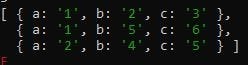
Data-driven testing:
'use strict';
//use fs to read file
let fs = require('fs');
//use csv-parse sync to parse the file : https://csv.js.org/parse/
const parse = require('csv-parse/lib/sync');
//read the csv file
let a = fs.readFileSync('1.csv');
//parse the csv file
const testdata = parse(a, {
    columns: true,
    skip_empty_lines: true
})
console.log(testdata);
describe('Validate dfsfdsf 1 behaviour', function () {
    for (let i of testdata) {
        it('test {Regression} {Sanity} {Smoke}', async function () {
			console.log(i);
            console.log(i.a);
            console.log(i.b);
            console.log(i.c);
            expect(Number(i.a) + Number(i.b)).toBe(Number(i.c))
        });
    }
});
Ignore below steps:
Deprecated:
npm package:
https://www.npmjs.com/package/csv-parser-sync-plus-promise
Usage:
importing:
let parser = require('csv-parser-sync-plus-promise')
Use as sync:
let a=parser.readCsvSync('')
Use as Promise:
let b=parser.readCsvPromise('')
it('test {Regression} {Sanity} {Sanity}', async function () {
console.log(await b);
});
Protractor test:
Use the demo csv ‘1.csv’
'use strict';
let parser = require('csv-parser-sync-plus-promise')
let testdata=parser.readCsvSync('<full_path>/1.csv');
describe('Validate dfsfdsf 1 behaviour', function () {

  for(let i of testdata){
    it('test {Regression} {Sanity} {Sanity}', async function () {
    console.log(i.a);
    console.log(i.b);
    console.log(i.c);
    expect(Number(i.a)+Number(i.b)).toBe(Number(i.c))
    });
  }
});
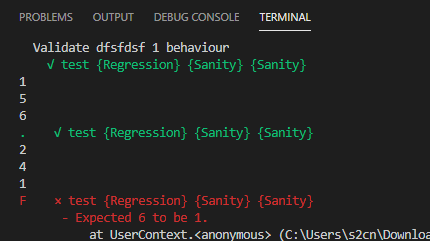
Output:
 Learn with praveen